

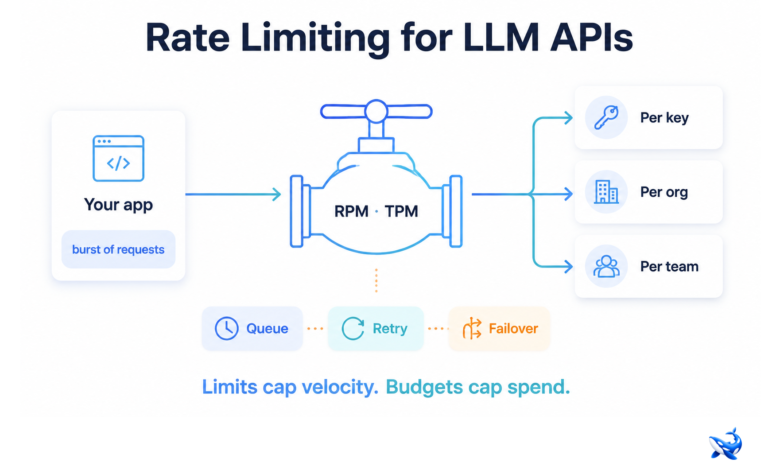
Rate limiting for LLM APIs is the one control you can actually rely on when traffic spikes: providers cap requests per minute (RPM) and tokens per minute (TPM), and the difference between a stable service and a wall of 429 errors is how you design around those ceilings. llm router caps velocity — how fast requests leave your system — while budgets cap spend, and an AI router is where the two finally get handled in the same place. This piece is the plain-English version of what those limits are, why vendors impose them, and how they’re handled at the routing layer so a single key can serve an entire team without a hand-rolled retry loop — and the live rate card for Claude Sonnet 5 shows what the mid-tier actually costs per million tokens behind that one key.
Almost every team that integrates a language model meets this wall the same way: a burst of concurrent requests — a batch job, forty agents starting at once — and suddenly the SDK is throwing 429s. The common first reaction is to raise the limit. The better reaction is to understand what the limit actually protects, because a 429 is not a failure of your quota — it is the provider telling you a shared resource is under pressure. Read that signal correctly and the ceiling becomes a scheduling problem you can design around.
What a rate limit actually protects
A rate limit is a statement about capacity, not about you. Vendors host inference on shared infrastructure, and every request competes for the same accelerators, network, and queuing. An RPM ceiling protects the fleet from a single customer’s runaway loop; a TPM ceiling protects the provider’s cost model from a single prompt that spawns an enormous response. That is why limits exist, and also why they come in two units instead of one: RPM bounds how many requests you may fire, TPM bounds how many tokens those requests may consume. A workload that streams long completions can sit well under its RPM ceiling and still be pinned against its token ceiling.
Where the limit attaches matters as much as its size. Vendors typically attach ceilings per API key, aggregate them at the organization level, and increasingly expose per-team or per-project buckets. In practice, the per-key number is the one you feel: a key shared by ten services crosses its ceiling the moment any two of them spike at the same time, even though the org as a whole has headroom. The exact tiers are vendor-reported and change as access programs evolve, so treat any published number as a snapshot and confirm current values on the provider’s own docs — but the shape is consistent: limits are tiered, they scale with spend and review status, and the tier is per-key even when the invoice is per-org.
| Limit type | How it works | Where it bites |
| RPM (requests per minute) | Ceiling on how many requests you may fire in a window | Concurrent agents, batch jobs, webhooks |
| TPM (tokens per minute) | Ceiling on how many tokens your requests consume | Long generations and streaming workloads |
| Per-key | Attaches to a single API key | A shared key across many services |
| Per-org | Aggregates all keys under one account | Multi-team accounts on one invoice |
| Per-team / per-project | Dedicated buckets you assign | Features you want to isolate from each other |
Rate limiting vs. cost budgeting: velocity, not spend
The two controls teams most often confuse are rate limits and budgets, and a router is where they finally get separated. A rate limit caps velocity: how many requests, and how many tokens, can move in a window. A budget caps spend: how much money those requests may cost in a month. They interact — more tokens usually means more money — but they are enforced against different constraints, and the moment you treat one as the other you will be wrong twice. Rate-limit only, and a cheap, high-volume workload runs all month and quietly overspends. Budget only, and a burst crosses the provider’s ceiling before the budget even notices.
This is why the two belong in the same control plane. Rate limits shape throughput, budgets shape cost, and roles decide who may call which model in the first place. OrcaRouter’s budgets-and-roles page is exactly that pair of dials — per-team and per-project limits on one side, spend caps on the other, enforced by the router rather than by team discipline.
What a gateway does with rate limits
Once you have more than one key, more than one team, or more than one provider, the per-key ceilings on your dashboard stop being the constraint you manage. You manage the layer above them. An AI router concentrates every key behind one endpoint and re-implements the rules that used to live scattered across your SDK code and your spreadsheet.
One set of limits across every key and provider. A single API key reaches 200+ models across providers [OURS — orcarouter.ai homepage], so the router can enforce your own per-team and per-project ceilings on top of that. “This team may not fire more than N concurrent requests” becomes one rule in one place instead of a policy each service re-implements differently. When a provider raises its tier or rotates a key, the router absorbs the change and your services never recompile.
Fair-share under spikes. When a batch job and an interactive feature share a quota, the router can reserve headroom for the interactive traffic and let the batch wait. That is fair-share: the ceiling is a shared pool, and the router decides who draws from it first. Without the layer, both services slam the same key, both get throttled, and users see 429s the batch should have absorbed.
Limits and budgets meet. A quota caps velocity, a budget caps spend, and a router enforces both per team and per project. That is what OrcaRouter’s budgets and roles feature does — which teams may call which models, how much those calls may cost, and how much traffic each may send, all in one enforcement layer [OURS — orcarouter.ai budgets & roles page]. And because OrcaRouter passes provider list prices through at 0% markup [OURS — orcarouter.ai zero-markup-cost page], the budget you set is the price you plan against, not a guess.

Designing so the ceiling costs nothing
Assume you will still brush against a ceiling — every quota structure has one — and design so that brushing against it costs nothing.
Queue and batch the bursty work. A queue absorbs spikes instead of firing concurrent requests straight at the ceiling. Batch processing is where a slow window is acceptable, because nobody is watching a spinner.
Retry with backoff and jitter. Exponential backoff with random jitter handles the burst case far better than a fixed retry loop, which only synchronizes all your clients onto the same collision. Respect any retry-after window the API returns.
Fail over to the next route. A per-key ceiling stops being a global ceiling when a request that would have 429ed against one path is served from another. Automatic failover does exactly that: the router re-routes the request and your application never sees the error [OURS — orcarouter.ai homepage].
Route to the less-loaded model. Adaptive routing grades each prompt in under a millisecond and sends it to the cheapest model that meets your standard [OURS — orcarouter.ai homepage], while load balancing spreads traffic across instances so no single endpoint becomes the bottleneck. The batch traffic, the streaming traffic, and the interactive traffic each get the path with headroom instead of all colliding on the first choice.

The takeaway
Rate limiting for LLM APIs is velocity control, budgeting is spend control, and a router is where the two are enforced in one layer. It suits any team with multiple keys, multiple providers, or multiple teams sharing one account: set per-team and per-project limits, queue the bursty work, retry with backoff and jitter, turn on automatic failover, and route to the models with headroom. It is overkill for a single model behind a single key — there, a rate limit is just a number on a dashboard. Decide in this order: first separate velocity from spend, then centralize the limits at the routing layer, then design the queue and retry behavior so a 429 anywhere in the stack is handled internally rather than surfaced to a user. The limit is the provider’s wall. How you route around it is yours.
Sourcing note: rate-limit mechanics — RPM/TPM units, per-key versus per-org versus per-team scoping, and tiered limits that scale with spend and review — are vendor-reported mechanisms; confirm current values on each provider’s own docs. The limit-type table is the author’s synthesis of vendor-reported behavior. Product facts about OrcaRouter (one API key for 200+ models, automatic failover, adaptive routing that grades prompts in under a millisecond, budgets and roles, 0% markup pass-through of provider list prices) are from OrcaRouter’s homepage and product pages, verified August 22, 2026 [OURS].