

In 2026, vertical short-form video is the fastest way to get attention, traffic, and sales. The irony is that most creators and brands already have enough content to post daily for a year: photos. Product shots, behind-the-scenes images, event photos, portfolio work—all sitting unused. With modern AI technology, those static photos can be turned into polished, viral-ready shorts in minutes, without a film crew or complex editing skills.
Why Image to Video Is So Important Now
Shorts, Reels, and TikToks dominate attention. But producing constant video brings three problems: it’s expensive, it’s slow, and it wastes existing assets.
Image to video AI changes this by:
- Transforming still images into motion-rich clips
- Simulating camera moves (pans, zooms, depth effects) automatically
- Outputting vertical, platform-ready videos quickly
Result: more content, lower cost, and real ROI on assets you already own.
What Modern Image to Video Tools Can Actually Do
Today’s tools go way beyond slideshow-style videos. The strongest platforms in 2026 typically offer:
1. Smart Motion and Depth
AI can infer depth from 2D photos and create subtle 3D-like effects: foreground/background separation, parallax, tracked focus on faces or products. Instead of flat cuts, your images feel like scenes from a live-action clip.
2. Automatic Story Building
Upload a batch of images and the system can:
- Group related photos
- Suggest an order that tells a story (before → during → after)
- Propose hook lines, captions, and on-screen text
You don’t start with a timeline; you start with intent, and the AI drafts a structure.
3. Branding and Templates
You can save:
- Brand colors, fonts, logo placement
- Preferred transitions and pacing
- Style presets (cinematic, product promo, tutorial, testimonial)
That turns one-off edits into a repeatable system.
4. Voice, Music, and Text Automation
Modern image to video engines can:
- Generate voiceovers from a short script or prompt
- Suggest royalty-free tracks matched to mood and tempo
- Time captions and titles to the beat and key visual moments
So you’re not just animating images—you’re shipping full, shareable videos.
Turning Static Photos Into Viral Shorts: Practical Workflow
1. Choose Images With Built-In Story Power
When creating engaging shorts, start by choosing images with built-in story power.
Not every photo works equally well. Look for clear subjects, decent resolution and lighting, and sequences that naturally tell a story. With image tools like Picsart AI, you can quickly enhance these raw images and turn them into polished, narrative‑driven clips without complex editing.
2. Decide Your Hook Before You Touch the Tool
AI is powerful, but it works best when guided. Define:
- Who this video is for
- The core promise, curiosity, or emotion
- The action you want at the end (follow, comment, click, save)
Examples:
- “10 seconds to see this room completely transform.”
- “From sketch to finished artwork in 6 frames.”
- “This is how we turned one idea into a 7-figure brand.”
This hook should appear visually (text on screen) and conceptually (how the sequence is built).
Using Image to Video AI Effectively
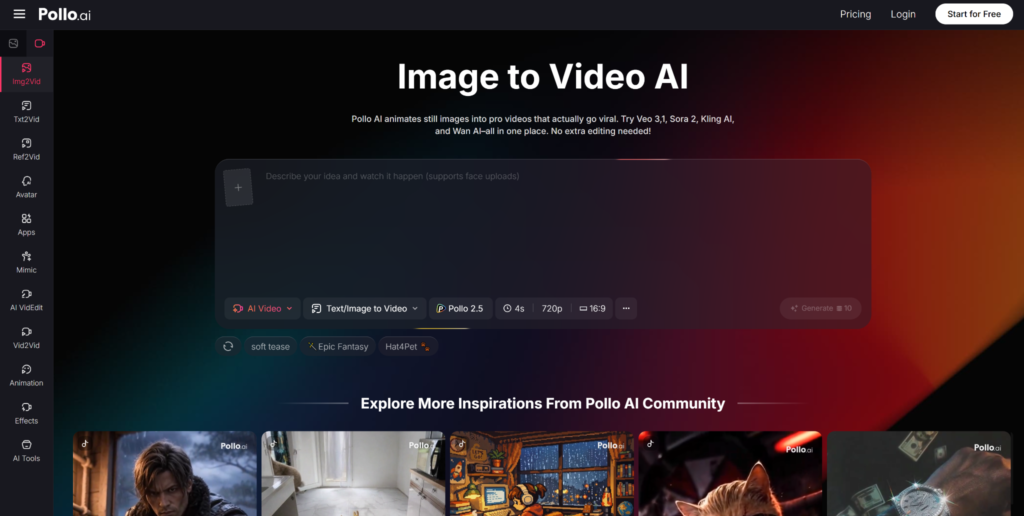
In 2026, tools built specifically for short-form vertical content outperform generic editors. Pollo AI is a strong example of this kind of focused platform.
A typical Pollo AI workflow looks like this:
- Upload 3–15 images (product shots, project stages, client results, etc.).
- Pick a template tuned for your goal: “Transformation,” “Product Highlight,” “Step-by-Step,” “Testimonial,” and so on.
- Enter a short prompt or hook (e.g., “Show how this room changes from empty to fully designed in under 15 seconds”).
- Let the AI generate multiple image to video variations, each with different motion, text, and pacing.
- Choose your favorite, then quickly adjust text, music, or duration if needed.
Pollo AI handles the technical side—motion paths, rhythm, transitions, vertical formatting—so you can focus on message and brand.
Making Your AI Shorts More “Viral-Ready”
1. Win the First 2 Seconds
Most viewers decide instantly whether to swipe away. Your first frame and motion should:
- Show a strong visual: a dramatic before, a close-up, or a surprising angle
- Include a clear on-screen hook (“Nobody tells you this…”, “Don’t make this mistake…”, “Watch what happens…”)
- Start with noticeable motion: quick zoom, fast reveal, or a bold cut
Many tools, including Pollo AI, let you pick a “hero frame” and emphasize motion at the start.
2. Keep a Simple Structure
Even 10–20 seconds needs a quick arc. For example, with renovation photos:
- Hook: “This was our client’s ‘impossible’ living room…”
- Build: 2–3 images of planning, work, or design choices
- Payoff: final reveal
- CTA: “Comment ‘plan’ if you want the layout breakdown.”
AI can propose text and pacing, but your understanding of your audience makes it land.
3. Match Platform Norms Automatically
In 2026, best practices are fairly stable:
- Vertical 9:16 format
- Under 30 seconds for discovery content
- Always use subtitles or bold on-screen text
- Use music or audio that fits
A tool like Pollo AI bakes this in by default: vertical output, typical high-retention durations, text-safe zones so nothing is hidden by UI, and soundtrack suggestions.
Scaling From One Short to a Content System
The real power of image to video AI is scale. Instead of thinking “one video from a few photos,” think “dozens of variations from every image set.”
A simple system:
- Batch your images by theme: each product line, every case study, every client story, each tutorial.
- Generate multiple versions for each batch: different hooks, angles (emotional vs. data-driven), pacing, and music.
- Publish across platforms (TikTok, Reels, Shorts) with small tweaks in captions and CTAs.
- Track performance: watch which hooks, lengths, and styles do best.
- Feed winners back into your presets and templates in Pollo AI, so the AI leans toward proven patterns.
Over time, you end up with a “house style” that both your audience and the algorithm respond to—and you create it from photos you already had.
Conclusion
In 2026, photo libraries are not archives; they’re the raw fuel for daily shorts. With image to video technology and tools like Pollo AI, you can turn old folders into new reach: more views, more engagement, more leads—without reshooting everything as video. The gap isn’t in resources; it’s in transformation. Once you bridge that gap with the right workflow and tools, your “static” images become an ongoing source of viral potential.