
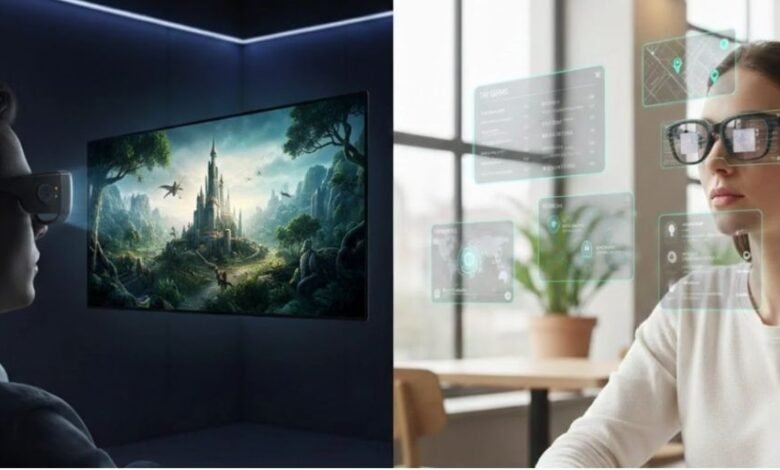
AR smart glasses have moved past the prototype stage. In 2026, they handle tasks that once required a phone, a monitor, or a human translator — and the entire setup fits inside a standard glasses case.
Augmented reality smart glasses overlay digital content onto the physical world. Some project a widescreen display for movies and games. Others run onboard AI, translate foreign languages in real time, and deliver hands-free navigation.
This guide breaks down the real-world use cases that matter most in 2026, compares the key hardware specs that affect daily usability, and identifies which models stand out in each category.
What Sets Modern AR Smart Glasses Apart
Traditional smart glasses added a camera and a speaker to ordinary frames. Today’s AR smart glasses pack Micro-OLED or Micro-LED displays, spatial audio systems, and AI processors into housings under 80 grams. The market divides into three categories:
- Display glasses project virtual screens up to 201 inches for entertainment and productivity. They connect to phones, laptops, and handheld consoles over USB-C (DisplayPort Alt Mode).
- Standalone AI glasses like the RayNeo X3 Pro run their own OS and handle translation, navigation, and voice commands — though some features still depend on network connectivity.
- Camera-equipped frames like the Ray-Ban Meta (Gen 2) focus on photo and video capture with built-in AI but offer no visual display.
Entertainment and Gaming
The most immediate use case for augmented reality smart glasses is replacing a physical screen entirely. A 201-inch virtual display in a pair of 76-gram glasses removes the need for a separate monitor or projector setup.
Private Cinema for Travel
Long flights and train rides turn into private theater sessions with the right hardware. The RayNeo Air 4 Pro projects a 201-inch equivalent screen with what RayNeo calls the first HDR10 display in AR glasses. Its Bang & Olufsen-tuned quad-speaker array keeps audio private and directional.
Console and PC Gaming
AR smart glasses pair with handheld consoles like Steam Deck over USB-C DisplayPort for a big-screen gaming setup that fits in a backpack. The Air 4 Pro runs at 120Hz with HDR10 output. Home consoles like PS5 require an HDMI adapter rather than direct USB-C, so check compatibility before purchasing.
3D Content and Streaming
The Air 4 Pro converts standard 2D video into stereoscopic 3D through its Vision 4000 chip and onboard AI processing. Combined with 3840×1080 resolution in 3D mode and a 200,000:1 contrast ratio, the conversion produces noticeable depth without native 3D source material.
Real-World Applications Beyond the Screen
Entertainment sells the first pair of augmented reality smart glasses. Daily utility keeps them on your face long term. The strongest growth in this category comes from use cases that reduce friction in everyday routines.
Real-Time Translation for Travelers
The RayNeo X3 Pro offers what the company describes as Microsoft-powered translation across 14 languages in three modes: live voice with AR subtitle overlay, video subtitle generation, and OCR for printed signs and menus.
Competing augmented reality smart glasses like the Even Realities G1 offer basic translation at 640×200 resolution on a monochrome screen. The X3 Pro renders full-color subtitles on a Micro-LED display rated at 6,000 nits peak brightness, readable in direct sunlight.
Hands-Free AR Navigation
The X3 Pro projects turn-by-turn navigation overlays into the wearer’s line of sight using dual cameras with SLAM spatial mapping. This suits pedestrians exploring unfamiliar cities, though it should not replace normal situational awareness.
AI That Sees What You See
The X3 Pro integrates Google Gemini 2.5, according to RayNeo, as a multimodal assistant. Point at an object and ask — the system processes the camera feed and responds. The Ray-Ban Meta (Gen 2) offers Meta AI, but without a display, responses stay audio-only.
Remote Work and Multi-Screen Setups
Augmented reality smart glasses can replace external monitors when working from a cafe, hotel, or airplane seat. The Air 4 Pro extends a laptop display over USB-C at 1920×1080 with a balanced 46.7:53.3 weight distribution designed to reduce pressure on the nose bridge.

How the Leading Models Stack Up
Not all AR smart glasses target the same user or the same daily workflow. The table below compares key specs across representative augmented reality smart glasses from different product categories. Prices reflect listed U.S. retail at publication time.
| Feature | RayNeo Air 4 Pro | RayNeo X3 Pro | XREAL 1S | Ray-Ban Meta (Gen 2) |
|---|---|---|---|---|
| Category | Display | Standalone AI + AR | Display | Camera + AI |
| Price | $299 | $1,299 | $449 | $299 |
| Display | Micro-OLED 1080p | Micro-LED 6,000 nits | Micro-OLED 1200p | None |
| Virtual Screen | 201 inches | 43 inches | 500 inches | N/A |
| HDR | √ HDR10 | N/A | × | × |
| Refresh Rate | 120Hz | N/A | 120Hz | N/A |
| AI | AI image processing | Google Gemini 2.5 | × | Meta AI |
| Translation | × | 14 languages | × | Limited |
| Weight | 76g | 76g | 82g | 49g |
Display Quality and HDR
Micro-OLED delivers strong contrast and color accuracy for indoor use. The Air 4 Pro covers 98% DCI-P3 with color accuracy rated at ΔE<2, according to RayNeo’s published specs. Micro-LED excels outdoors: the X3 Pro’s Firefly engine is rated at 6,000 nits peak.
Weight and Comfort for Extended Wear
Weight and balance both affect how AR smart glasses feel during extended sessions. Both RayNeo models weigh 76 grams. The XREAL 1S comes in at 82 grams, while the Ray-Ban Meta (Gen 2) weighs approximately 49 grams but lacks a display entirely.
Price-to-Feature Value
At $299, the Air 4 Pro stands out in the display-glasses segment by combining HDR10, Bang & Olufsen-tuned audio, and AI image processing. The Viture Pro XR offers comparable screen size and 120Hz but costs $459 without HDR. Tom’s Guide lists the Air 4 Pro in its “best value” category.
What to Check Before You Buy
Choosing the right pair of AR smart glasses comes down to matching device category to your primary use case. Budget, compatibility, and comfort separate a practical purchase from a disappointing one:
- Use case priority. Display glasses like the Air 4 Pro suit entertainment and gaming. Standalone models like the X3 Pro target translation, navigation, and hands-free AI — though some functions depend on connectivity.
- Source device compatibility. Display AR smart glasses require a connected device with USB-C DisplayPort output. Home consoles like PS5 need an HDMI adapter. Check the manufacturer’s compatibility list before ordering.
- Comfort threshold. Weight and weight distribution both affect whether augmented reality smart glasses become daily tools or sit unused after the first week. Try before committing to extended use.
The Road Ahead
AR smart glasses are entering a new phase as more major players invest in the category. Google, Samsung, and Apple have all signaled interest, though shipping timelines and final product details remain uncertain. The market is maturing — practical products exist today, and competition is accelerating.