
Deploying a self-service kiosk for visitor check-ins, order pickups, and HR workflows directly eliminates repetitive staff tasks.
This approach recovers hundreds of operational hours that are typically lost to manual data entry.
Administrative friction is a universal drain on productivity across multiple industries.
For instance, international data highlights that professionals like teachers often spend 38 hours weekly on total job tasks, with barely half of that time devoted to their core expertise.
1. The Silent Receptionist Visitor Check In
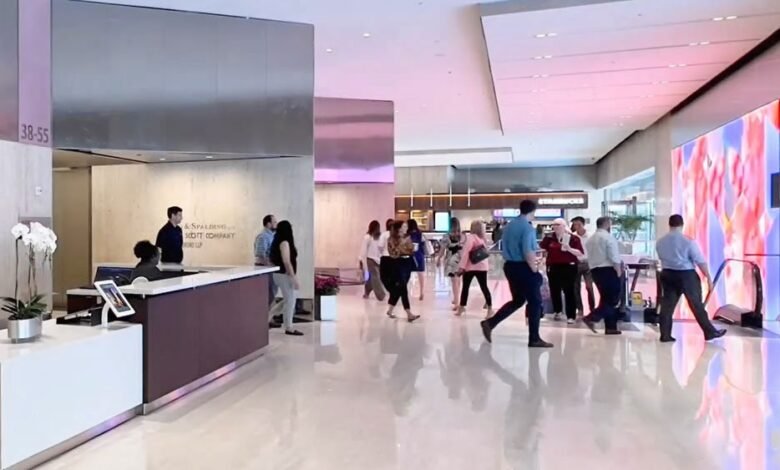
The most visible bottleneck in any commercial space is the front desk during peak arrival hours.
Manual logbooks, handwritten badges, and constant interruptions regularly pull receptionists away from productive work.
Transitioning to a digital workflow completely removes this friction while maintaining a welcoming atmosphere.
The visitor simply inputs their name, selects their host, captures a quick photo, and signs the necessary agreements.
The system then automatically prints a physical badge while firing an instant host notification via instant messaging or email.
Front-desk staff immediately recover hours of focused time that used to be spent tracking down hosts.
Furthermore, illegible paper records are instantly replaced with highly organised digital logs.
This transition also improves emergency readiness by maintaining an accurate, real-time evacuation list.
For optimal operational fit, positioning a versatile iPad floor stand from VidaBox slightly ahead of the human desk naturally intercepts arriving visitors.
This placement captures attention before guests reach the counter, smoothly guiding them toward the self-service option.
To ensure accessibility, keep a staff member visible nearby during the first two weeks. This brief support window encourages adoption without entirely removing the human fallback option.
| Key Insight: Searchable digital visitor logs do more than eliminate paper. They create a legally defensible audit trail that protects your organisation during liability disputes, safety audits, or compliance reviews. |
2. The Patient Pathfinder Order Pickup
Across large retail spaces, clinics, and multi-wing offices, staff field the same directional questions repeatedly.
These repetitive interactions require zero specialised expertise but consume massive amounts of annual payroll.
Implementing targeted self-service pathways resolves this instantly and elegantly.
In a retail environment, a quick barcode scan triggers a stockroom notification and provides an on-screen progress update.
This automated flow results in zero queues and prevents unnecessary transactional conversations.
In a medical or corporate setting, a quick ID swipe handles insurance verification and completes the check-in process seamlessly.
The screen then provides a visual map routing directly to the correct room or wing. This strategy recovers valuable staff hours while significantly reducing everyday customer frustration.
Frame the kiosk explicitly as an express lane rather than a complete replacement for human staff.
Users who prefer personal interaction retain that path, while the screen absorbs high-volume traffic.
Most property management platforms offer compatible integrations that require minimal custom development.
This makes the technical rollout surprisingly straightforward for IT departments to execute.
3. The Always On Lead Generator
In high-traffic environments like trade shows or luxury showrooms, major bottlenecks occur when multiple prospects arrive simultaneously.
Too often, qualified leads leave without ever hitting a data capture touchpoint because representatives are occupied.
A well-placed digital interface transforms this lost opportunity into an automated value exchange.
Visitors can easily interact with a digital product configurator or interactive builder independently.
By entering their contact details, users receive a personalised quote or digital rendering directly to their inbox.
Because this lead lands perfectly in the CRM pre-qualified, the return on investment is incredibly substantial.
Prospects frequently provide honest, self-reported budget data, reducing the time sales reps spend on initial discovery.
The digital interface captures crucial information that social pressure often suppresses during face-to-face conversations.
Place the hardware exactly at the entry point of the booth or showroom to maximise engagement.
This captures interest long before a representative is available, rather than using the screen merely as a fallback.
Software tools like interactive forms and custom-built configurators integrate cleanly with most CRM platforms.
This modern approach keeps your sales pipeline full without demanding heavy technical resources.
4. The Back Office Liberator HR Workflows
The utility of a digital endpoint extends far beyond traditional customer-facing scenarios. In the back office, administrative bottlenecks constantly disrupt operations and slow down internal communications.
Time-off requests get lost on whiteboards, and shift swaps frequently trigger chaotic group-text chains.
Meanwhile, routine IT tickets for simple password resets consume hours of valuable management time.
An employee self-service workflow effectively streamlines all of these disjointed administrative tasks.
A simple badge swipe opens a personalised dashboard where workers can view schedules or submit leave requests.
The resulting efficiency is multifaceted, allowing managers to recover hours previously lost to these manual interruptions.
Payroll accuracy is highly elevated, and overall employee autonomy increases dramatically.
Install the hardware in the breakroom or near the primary start-of-shift traffic zone for maximum visibility.
Internal messaging should always lead with the direct benefit of instant access to scheduling data.
Utilising standard device management software locks the tablet into a secure application mode.
This prevents unintended browsing while maintaining a highly consistent and reliable employee experience.
| Important: Install the HR self-service kiosk in the breakroom, not under surveillance. If staff perceive it as a monitoring tool, trust evaporates, and voluntary adoption will never take off. |
Choosing Hardware That Makes Software Work
All four of these operational workflows share one absolute, non-negotiable requirement. The physical hardware must communicate the exact same professionalism as the software it securely houses.
Commercial-grade enclosures must accomplish several core objectives regardless of their specific environment.
Reliable setups require hidden cable routing, compliant screen height positioning, and highly tamper-resistant casing.
Choosing the right form factor signals reliable permanence rather than a temporary, improvised solution.
Engineered with zero-clearance wiring and robust security measures, proper stands integrate seamlessly into busy environments.
They provide ergonomic positioning calibrated for diverse users across clinics, retail floors, and event venues.
The physical build quality inherently reassures users that their sensitive data is being handled securely.
Ultimately, the enclosure is never merely an aesthetic finishing detail for your setup. It is the critical variable separating a considered, successful pilot program from one that looks unprofessional.
Investing in stable mounting solutions ensures that the entire digital deployment operates flawlessly under heavy daily use.
This physical foundation guarantees that your software investment actually delivers its promised administrative relief.
Making It Happen
This four-week framework applies the underlying efficiency principle directly to your implementation process.
Always start with one single use case in a localised area before scaling operations broadly.
Select one specific workflow and map the exact data flow before ordering any physical hardware.
Once mapped, secure commercial-grade screens in a strategic position that naturally intercepts daily foot traffic.
Station a staff member beside the screen to gently guide users without removing their traditional choices.
Adoption accelerates rapidly with brief, low-pressure coaching from a friendly face during the first week.
Finally, pull usage logs and calculate the exact administrative hours returned to your staff. This successful initial test will effortlessly provide the data needed to justify your next location.